
Build a Phone Empire
Comece em uma garagem em 2007 e transforme o negócio em uma empresa global de dispositivos. Crie produtos, escolha peças, defina preços, lance campanhas, acompanhe vendas e invista em pesquisa e expansão do escritório.
Guias recentes do jogo
Comece aqui
Monte sua primeira empresa
Páginas populares
Explore o negócio
O que é Build a Phone Empire?
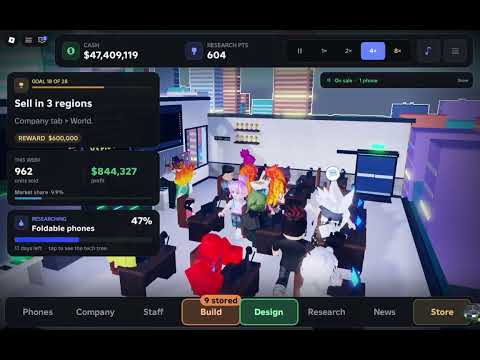
Build a Phone Empire é uma simulação de negócios no Roblox criada pela DEVTEC STUDIOS. Você começa em uma garagem em 2007 e desenvolve uma empresa global de dispositivos.
Crie produtos, escolha componentes e preços, passe o projeto à equipe e lance campanhas de marketing. Vendas, pesquisa, funcionários e expansão do escritório conduzem o progresso. Os números desta página são um retrato de 8 de outubro de 2026.
Jogadores · dado de 8 out.
6.314
Visitas · dado de 8 out.
1.096.838
Favoritos · dado de 8 out.
12.189
Aprovação · dado de 8 out.
79,1%
Explore Build a Phone Empire
Escolha um sistema para planejar lançamentos e expandir a empresa.
Guia de códigos e dinheiro de Build a Phone Empire
As listas de códigos divergem e a descrição oficial não confirma resgate em 8 de outubro de 2026. A fonte documentada de dinheiro grátis são as 28 metas com recompensas.
No code has been verified against an official DEVTEC STUDIOS announcement or in-game redemption screen as of October 8, 2026.
Some unofficial code listings conflict with sources reporting zero working codes; none supplies an official reward confirmation.
The official Roblox description does not identify a Codes button or redemption procedure; do not invent one.
DEVTEC STUDIOS explicitly advertises 28 goals with Cash rewards as a real earning route.
Check in-game goal completion and available Cash claims as you design, launch, research, and expand.
The developer asks players to like and favorite the experience to follow updates, without specifying a reward for doing so.
Use the official DEVTEC STUDIOS Roblox community and game description to confirm future codes or events.
Guia para iniciantes de Build a Phone Empire
Você começa em uma garagem em 2007 e desenvolve uma empresa global: crie dispositivos, escolha peças, defina preços, faça campanhas, acompanhe vendas e invista em pesquisa e escritórios.
- 1Join DEVTEC STUDIOS' official Build a Phone Empire at Roblox place ID 101914705206759.
- 2Start in the 2007 garage and inspect the initial company workspace before spending on decorations.
- 3Open the device designer and begin with a phone, the game's starting product category.
- 4Choose the screen size, cameras, corners, buttons, colors, finish, and logo for your first device.
- 5Select available internal parts using the options currently unlocked for the starting year.
- 6Set the phone's selling price and compare it with the displayed hardware or development cost, if shown.
- 7Hand the finished design to your team so it can move through the game's development-and-launch loop.
- 8Choose a marketing campaign before launching your phone.
- 9Read the critics' reviews after release and monitor the live sales results.
- 10Use the next design to adjust a disappointing price or component mix, rather than assuming one launch is optimal.
- 11Hire employees and add desks as the team and office outgrow the initial garage.
- 12Research new technologies as in-game years advance to open additional hardware and device categories.
- 13Check the 28 goals for available Cash rewards, then invest in expansion or a stronger next launch.
- 14Progress toward the Headquarters and new sales regions before considering the permanent Legacy reset.
Guia de design e componentes
O editor permite ajustar formato, hardware, acabamento, marca e preço. Não há uma configuração universal de nível S confirmada.
Choose the dimensions of the phone display in the designer.
Configure the camera setup for the device; the available selections depend on the current editor.
Set how rounded or squared the outer phone corners appear.
Customize the phone's button arrangement as part of the exterior design.
Choose the visible handset color to distinguish models in your lineup.
Set the device finish independently from the base color where the editor offers both.
Add your chosen logo or branding to the phone design.
Choose the components used by the product instead of changing its appearance alone.
Set a separate retail price after choosing the design and parts.
Submit the configured phone to your team as the next step toward launch.
Read post-launch critics' reviews to assess the reception of that design.
Compare the released phone's sales with the next model's results before declaring one specification best.
Year-by-year research unlocks additional technology, so the current editor may differ from a late-game one.
Guia de preços, marketing e vendas
Cada lançamento combina design, preço e marketing, e gera avaliações e vendas. Não existe margem ou tabela de lucro universal publicada.
- 1Select an available product category and configure the desired components.
- 2Review your design and its available cost information before choosing the retail price.
- 3Set a product price you want to test instead of assuming maximum price guarantees maximum revenue.
- 4Pass the completed product to your hired team.
- 5Select one of the marketing campaigns offered in the live launch interface.
- 6Complete the product launch and wait for customer sales data to appear.
- 7Read the critics' reviews, which are explicitly part of the developer's launch loop.
- 8Observe sales live instead of judging the design solely by its appearance.
- 9If sales are disappointing, change one factor such as price or hardware selection on the next device.
- 10Compare successive product launches to understand which changes improve your current company's results.
- 11Use successful product revenue to fund research, employees, or office expansion.
- 12As new sales regions unlock, check whether a product needs a new price or campaign before its next launch.
Guia de pesquisa, tecnologias e dispositivos
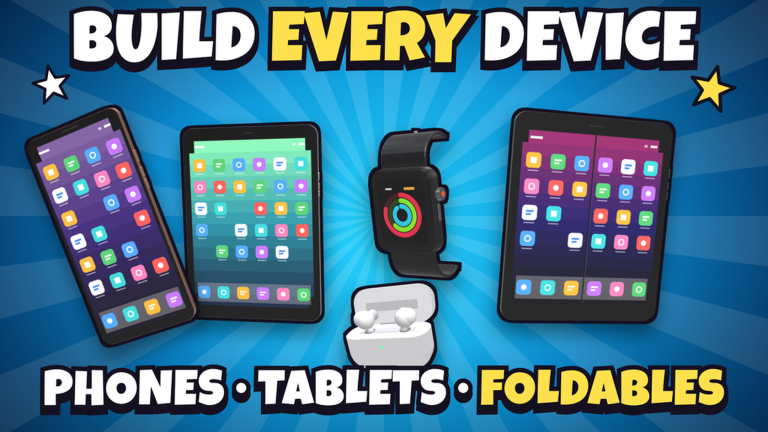
A pesquisa avança com os anos e libera tecnologias e linhas de produtos. A descrição oficial lista seis categorias, mas não informa custos ou rankings universais.
The company begins in 2007, making technological progression an explicit part of the simulation.
Phones are the initial product type that players can fully design and sell.
Researchable device category listed in the official description.
Additional wearable-device product line unlocked through research.
Audio-device category available as technology develops.
Later device form factor explicitly listed as a research unlock.
A sixth product category included in the latest official October 2026 description.
Research new technologies as the simulated years move forward.
Check the current designer after a research unlock for newly available technology.
Use unlocked products to expand beyond the starting phone business.
Favor the next unlock that makes an actual product you plan to design or sell; fixed optimal costs are not publicly documented.
Read the current research interface for prerequisites and prices; the official description does not publish a complete tech-tree table.
Guia do escritório e da sede
Personalize o escritório da garagem à sede. É possível construir paredes, portas e pisos e adicionar pintura, mesas e decoração.
The initial company workspace in the year 2007.
Build and arrange wall sections to define rooms and interior space.
Place doors as part of the office layout and room access.
Customize the floor surfaces of your work areas.
Recolor the building's surfaces with the office painting tools.
Furnish work areas with desks for the team working in the office.
Add decorative furniture and objects beyond the essential workstations.
The description says you build the office your way, rather than requiring one fixed arrangement.
Expand the physical workplace as the business outgrows the starting garage.
The named long-term destination of the office-building progression.
Hired employees appear inside your office as their Roblox avatars.
Consider whether a new desk or room is needed for growth before spending all Cash on decorative changes.
Guia para contratar funcionários e amigos
Amigos do Roblox podem aparecer entre os candidatos e trabalhar com seus avatares. Não há uma tabela pública completa de níveis ou salários.
- 1Set up your initial company and design a starting device before expanding the workforce.
- 2Open the live hiring interface when you are ready to add staff.
- 3Examine the available candidates instead of assuming every worker has identical attributes.
- 4Look for Roblox friends in the candidate pool; their appearances are pulled into the game.
- 5Select an appropriate available candidate and confirm the displayed hiring cost or condition.
- 6Check that the recruited employee appears in the office using their Roblox avatar.
- 7Add or rearrange desks if the physical workspace needs more room for the team.
- 8Hand a completed phone design to the team so the project can progress toward its marketing launch.
- 9Observe whether the current staff arrangement supports your planned pace of launching devices.
- 10Before another hire, compare the available Cash with research, equipment, and office-building priorities.
- 11Recheck the hiring interface after the next office or technology expansion; specific wages and rank bonuses are not officially published.
Guia de metas, Legacy e expansão
Os sistemas confirmados incluem 28 metas com dinheiro, rivais, expansão regional, placares e um reinício Legacy com bônus permanente. O multiplicador não foi publicado.
The developer confirms a total of 28 objectives, each associated with a Cash reward.
Goal completion supplements revenue earned from launching and selling devices.
Players are explicitly challenged to beat competing phone companies.
Regional market expansion is a named stage of long-term business growth.
The developer lists worldwide rankings as a competitive endgame target.
The company can be sold to begin a new run rather than only expanding the same business indefinitely.
Selling and restarting awards a permanent Legacy bonus for subsequent runs.
The reset is described as starting again; read its current confirmation before selling a successful company.
The official description does not disclose a guaranteed Legacy percentage, reset price, or optimal sale year.
Check which of the 28 goals can be completed before a restart, especially if Cash would help current research.
The developer confirms that company progress saves automatically.
The official description names phone, tablet, and PC support.
The current Roblox game listing shows server capacity of eight players.
Perguntas frequentes
Respostas rápidas para começar e progredir.
Pronto para expandir sua empresa?
Planeje um produto, lance-o e avance em pesquisa e expansão.